
Operation Manual
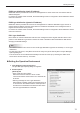

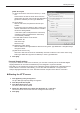

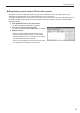

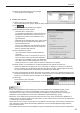

Table Of Contents

14
Installing/Launching
Adding a panel (viewer PC)
Click [Add/Edit Panel] in the [Tools] menu.1.
The [Panel Management] dialog box appears.
Click [Add New panel].2.
The [Add New Panel (Viewer PC)] dialog box appears.
3. Set the options.
(1) Panel Name (Required)
Choose a Name that will make it easy to identify the
panel.
(Names must be within 50 characters)
(2) Group
In the Group box, select a group to add the panel to.
If you do not want to assign the panel to any
particular group, select “(none)”. Panels that are not
assigned to any particular group will be added under
“All Panels”.
(3) Hostname or IP address (Required)
•WhenusingPUSHtypedistribution(staticIP
address), specify a host name or an IP address of
the viewer PC which is accessible from the server.
•WhenusingPUSHtypedistribution(dynamicIP
address) or PULL type distribution, specify the
viewer ID (alphanumeric characters) that starts
with “@”.
(4) MAC address
Set the MAC address for the viewer PC if you want to turn it on from the management PC.
(5) Distribution Type
Select “PUSH” to have the data sent to the viewer PC. Select “PULL” to have the viewer PC to
retrieve data at regular intervals from the management PC.
When using PUSH type distribution and if the viewer PC does not have a static IP address,
checkthe“DistributetoIPaddressnotiedfromviewers”checkbox.
(6) Power Management
IfyouwanttoturnthepoweroftheviewerPConoroffataspeciedtime,selectthe“Send
“Turn On/Off” command to Viewer PC at the following time”, and set the “Turn On at” and “Turn
Offat”.(Timescanbespeciedinincrementsof5minutes.)
(7) Clock Adjustment
To synchronize the clock of the management PC and that of the viewer PC, check the
“Synchronize Viewer PC’s clock with this PC’s clock” check box and specify the time to
synchronizetheclocks.(Timescanbespeciedinincrementsof5minutes.)
(8) Attributes
Enter comments for the viewer PC.
Click [Add].4.
TIPS
It is not possible to create two or more panels with the same host name, IP address or viewer ID.•