
Operation Manual
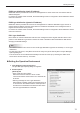

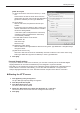


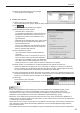

Table Of Contents

12
Installing/Launching
[Status monitoring] tab
Sets the options for Status Monitoring / Control (p.29).
(1) “Status of LCD monitor (PN series)” check box
Check this box to retrieve the panel status from the
viewer PC.
(2) “Current program” check box
Check this box to retrieve the current program
information from the viewer PC.
(3)“Licenseinformationandleversions”checkbox
Check this box to retrieve the license code and the
leversionoftheSHARPDigitalSignageSoftware
Viewer Version.
(4) “PC system information” check box
Check this box to retrieve the system information
from the viewer PC.
(5) Retrieving interval
Sets the interval for monitoring the status in the
automatic update mode.
This value will be ignored when the PULL type
distribution is selected. In the automatic update
mode,thestatusisnotiedeachtimetheviewerPC
accesses the management PC.
(6) Double Click on Thumbnail
Sets the application software to start when the thumbnail is double-clicked.
Ifyouselect“Opentheimagewiththefollowingapplication”,the.exelespeciedinthe
“Executablelepath”willbeexecuted.Thefollowing“Commandlinearguments”canbe
speciedforrunningtheapplication:
•%I:aparameterwhichisconvertedtothehostnameortheIPaddressoftheselectedpanel
•%T:aparameterwhichisconvertedtothethumbnaillepath
[FTP] tab
Sets the default FTP settings for adding new panels.
(1) User Name (within 30 alphanumeric characters)
(2) Password (within 30 alphanumeric characters)
(3) Port Number (1-32000)
The initial default values are as follows:•
User Name: ftp; Password: ftp; Port Number: 21
These values should be changed if there is any
security issue.
(1)
(2)
(3)
(4)
(5)
(6)
(1)
(2)
(3)