
Operation Manual
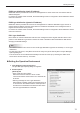

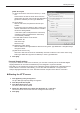

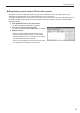

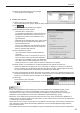

Table Of Contents

11
Installing/Launching
PUSH type distribution (static IP address)
Distribution data is provided via FTP from the management PC. Each viewer PC must have a static IP
address assigned.
IfaviewerPCresidesinsidearewall,therewallsettingsmustbeconguredtoallowdistributiondatato
reach the viewer PC.
PUSH type distribution (dynamic IP address)
Distribution data is provided via FTP from the management PC. With this distribution type, there is no
needforstaticIPaddress,becauseeachviewerPCnotiesitsIPaddresstothemanagementPCat
regular intervals via the HTTP protocol.
IfaviewerPCresidesinsidearewall,therewallsettingsmustbeconguredtoallowdistributiondatato
reach the viewer PC.
PULL type distribution
Each viewer PC retrieves distribution data from the management PC at regular intervals via the HTTP
protocol.ThisdistributiontypeallowsaviewerPCinsidearewalltoretrievedistributiondatawithout
changingtherewallsettings.
TIPS
You need to start the HTTP server to use “PUSH type distribution (dynamic IP address)” or “PULL type •
distribution”.
To start the HTTP server, click [Start HTTP server now] in the [HTTP Server] tab in the [Pro Manager •
Options] dialog box.
The HTTP server can be started automatically when the PC boots up by checking the “Start HTTP •
server when this PC boots up.” check box.
Setting the Operation Environment
Click [Options] in the [Tools] menu.1.
The [Pro Manager Options] dialog box appears.
2. Set the options
[General] tab
Show / Hide Function buttons •
Sets which function buttons to show or hide.
The function button whose check box is checked will
be shown.
Warning message for PULL type distribution •
Sets whether to display a warning message if there is
no access from the viewers within a certain period of
time after the scheduled access date and time when
the PULL type distribution is selected.