
Operation Manual
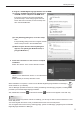
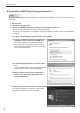
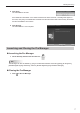

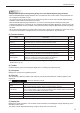
Table Of Contents

10
Installing/Launching
(8) Status bar
Displays the name of the selected panel or the schedule, the number of the panels in the display list and
of the selected panels, and so on.
If information such as the cause of an error cannot be displayed all inside a display list item, click the
relevant item to display the information in the Status bar.
Settingalter
Sets conditions for the panels to be displayed on the display list.
Click 1.
andthenclick[Createnewlter].
The [Create New Filter] dialog box appears.
2. Specify the “Filter Name”. (Names must be within 50
characters)
Select the “Properties”.3.
Set the “Conditions”.4.
The applicable conditions differ depending on the •
selected property.
When “Panel Name”, “Hostname” or “Comments 1 to •
3” are selected for the “Properties”:
Enteraconditionstringforthelter(within25
characters). Next, select whether the string should be
contained or not contained.
When “Network Acknowledgment” or “Distribution Status (**)” are selected for the “Properties” •
(Substitute ** with one of Schedule, Program, Scroll message and System update):
Select a condition from the list.
To add more conditions, click [Add New Condition] and follow the procedure from 3. •
Only the panels that satisfy all the conditions appear on the display list.
To delete an added condition, click [Delete].•
Click [Save].5.
Thelterissavedinthemenuandonlythepanelsthatsatisfytheconditionsappearonthedisplay
list.
Setting the Operation Environment
Distribution Type
The following distribution types are available with this software:
Distribution Type Protocol Management PC Viewer PC
1
PUSH type distribution
(static IP address)
FTP FTP client FTP server
2
PUSH type distribution
(dynamic IP address)
FTP
HTTP
FTP client
HTTP server
FTP server
HTTP client
3 PULL type distribution HTTP HTTP server HTTP client