
User Manual


3. LESS and MORE
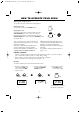
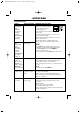
The LESS ( ▼ ) and MORE ( ▲ ) keys enable you to:
• Cook/defrost food for less or more time than the automatic programmes.
TO USE WITH AUTOMATIC PROGRAMMES:
EXPRESS COOK, EXPRESS DEFROST, AUTOCOOK
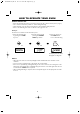
Press the LESS ( ▼ ) / MORE ( ▲ ) key before pressing the START button.
Example: If you prefer Jacket Potatoes which are cooked, but still firm, use the LESS ( ▼ ) key.
Alternatively, if you prefer Jacket Potatoes softer, use the MORE ( ▲ ) key.
NOTES:
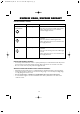
• If you select MORE the display will show, . If you select LESS, the display will show, .
• Some menus cannot use the LESS function. If you select LESS for them, will be displayed
when the START button is pressed.
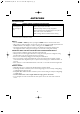
•To cancel LESS / MORE, press the same key again.
•To change MORE to LESS, press the LESS ( ▼ ) key.
•To change LESS to MORE, press the MORE ( ▲ ) key.
CONVENIENT FUNCTIONS
18
KITCHEN
TIMER
x1 x1
x5
NOTES:
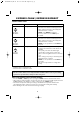
•You can enter any time up to 99 minutes, 90 seconds.
•To cancel the KITCHEN TIMER simply press the STOP/CLEAR button and the display will return
to the time of day, if set.
• The KITCHEN TIMER function cannot be used whilst the oven is in use.
•To check the time of day, open the door and press the CLOCK key.
4. KITCHEN TIMER
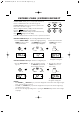
Use the KITCHEN TIMER as a minute timer or to monitor the standing time for cooked/defrosted food.
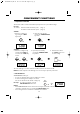
Example: To set the timer for 5 minutes:
3. Close the door. Press the
START button once to
start the timer.
2. Enter the desired time
by pressing the 1 MIN.
key 5 times.
1. Press the KITCHEN
TIMER key once or
press the KITCHEN
TIMER button once and
open the door.
x1
oror
UK R556D O/M,P1-31 05.7.11 3:20 PM Page 18 (1,1)