
Instruction manual


5
2. MITSUBISHI PLC 5-25
Connection to PLCs
Ladder Transfer Function
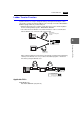
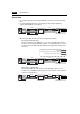
Up until now it was necessary to debug the data by removing and mounting two cables
repeatedly as shown below when the ZM-300 series is directly connected to MITSUBISHI’s
QnHCPU equipped with only one RS-232C port.
• RS232C cable between the computer and the PLC that is used for monitoring data in
the PLC or writing ladder programs: MITSUBISHI’s QC30R2
• The cable between the ZM-300 series and the PLC that is used for communications
with the ZM-300 series: Exclusive cable (order product)
When using the ladder transfer function by connecting the computer (PLC programming
software) to the ZM-300 series, it is possible to write ladder programs or monitor the
PLC memory using the ZM-300 series.
Applicable PLCs
MITSUBISHI PLCs
Q02, Q02H, Q06HCPU port (Q mode)
MELSEC
RESET
disc
GPPW
F1
F2
F3
F4
F5
F6
F7
SYSTEM
POWER
ZM-300
MITSUBISHI QnH series
MITSUBISHI’s
RS-232C connecting cable
QC30R2
Computer (PC)
ZM-300 series
RS-232C
connector
Exclusive cable
(order product)
QCPU2
MELSEC
CN1
RS-232C
RESET
disc
GPPW
(
ZM-71SE
)
ZM-80C
MJ1/2
COM
F1
F2
F3
F4
F5
F6
F7
SYSTEM
POWER
ZM-300
ZM-300 seriesComputer (PC)
MITSUBISHI QnH series
Communications between the
computer and the PLC
Communications between
ZM-300 and the PLC