
PN-L702B Operation-Manual GB


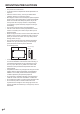


Table Of Contents
- IMPORTANT INFORMATION
- DEAR SHARP CUSTOMER
- SAFETY PRECAUTIONS
- TIPS AND SAFETY INSTRUCTIONS
- MOUNTING PRECAUTIONS
- Supplied Components
- System Requirements
- Part Names
- Connecting Peripheral Equipment
- Connecting the Power Cord
- Binding Cables
- Removing the Handles
- Preparing the Remote Control Unit
- Turning Power On/Off
- Touch Pen Preparations/Touch Action
- Basic Operation
- Menu Items
- Initialization (Reset)/Functional Restriction Setting (FUNCTION)
- Controlling the Monitor with a PC (RS-232C)
- Controlling the Monitor with a PC (LAN)
- Troubleshooting
- Specifications
- Mounting Precautions (For SHARP dealers and service engineers)

8
E
MOUNTING PRECAUTIONS
• Thisproductisforuseindoors.
• AmountingbracketcompliantwithVESAspecicationsis
required.
• Sincethemonitorisheavy,consultyourdealerbefore
installing, removing or moving the monitor.
• Mountingthemonitoronthewallrequiresspecialexpertise
andtheworkmustbeperformedbyanauthorizedSHARP
dealer. You should never attempt to perform any of this
work yourself. Our company will bear no responsibility
foraccidentsorinjuriescausedbyimpropermountingor
mishandling.
• Thismonitorcannotbeusedinverticalorientation.
• Usethemonitorwiththesurfaceperpendiculartoalevel
surface.Ifnecessary,themonitormaybetiltedupto20
degrees upward.
• Whenmovingthemonitor,besuretoholditwitheitherboth
handlesorthe4cornersonthebottomoftheunit.Donot
place your hand on the screen. This may cause product
damage,failure,orinjury.
• Thismonitorshouldbeusedatanambienttemperature
between41°F(5°C)and95°F(35°C).Provideenough
space around the monitor to prevent heat from
accumulating inside.
7-7/8 [20]
Unit: inch [cm]
2 [5]
2
[5]
2
[5]
1-7/16 [3.5]
• Ifitisdifculttoprovidesufcientspaceforanyreason
such as the installation of the monitor inside a housing, or
if the ambient temperature may be outside of the range
of41°F(5°C)to95°F(35°C),installafanortakeother
measures to keep the ambient temperature within the
requiredrange.
• Temperatureconditionmaychangewhenusingthemonitor
togetherwiththeoptionalequipmentsrecommendedby
SHARP. In such cases, please check the temperature
conditionspeciedbytheoptionalequipments.
• Donotblockanyventilationopenings.Ifthetemperature
inside the monitor rises, this could lead to a malfunction.
• Donotplacethemonitoronadevicewhichgeneratesheat.
• Donotusetheproductinlocationswheretheunitis
exposed to direct sunlight or other strong light. Since this
product operates with infrared rays, such light may cause a
malfunction.