10
n
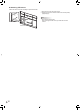
Attaching STB mount
Attach the STB mount when installing an optional controller.
1
2
STB mount
1. Remove the screws from this monitor.
2. Attach the STB mount with the STB mount screws (M3x6)
(supplied) (x2).
TIPS
• Store the removed screws.
After removing the STB mount, put back the removed
screws.