
Operation Manual


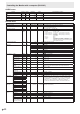
Table Of Contents
- IMPORTANT INFORMATION
- DEAR SHARP CUSTOMER
- SAFETY PRECAUTIONS
- TIPS AND SAFETY INSTRUCTIONS
- MOUNTING PRECAUTIONS
- Supplied Components
- System Requirements
- Part Names
- Connecting Peripheral Equipment
- Connecting the Power Cord
- Binding Cables
- Preparing the Remote Control Unit
- Removing the Handles
- Mounting a web camera
- Turning Power On/Off
- Touch Panel / Touch Pen Preparations
- Touch action
- Basic Operation
- Menu Items
- Initialization (Reset)/Functional Restriction Setting (FUNCTION)
- Controlling the Monitor with a computer (RS-232C)
- Controlling the Monitor with a computer (LAN)
- Troubleshooting
- Specifications
- Mounting Precautions (For SHARP dealers and service engineers)

48
E
Controlling the Monitor with a computer (RS-232C)
SCREEN menu
Function
Command Direction
Parameter Reply Control/Response contents *
AUTO ASNC W 1 When the input mode is D-SUB[RGB].
-
CLOCK CLCK WR 0-1200 0-1200 When the input mode is D-SUB[RGB].
Varies depending on the signal.
PHASE PHSE WR 0-63 0-63 When the input mode is D-SUB[RGB].
POSITIONING POSITION OF
THE LONGEST
DIRECTION
HPOS WR 0-100 0-100 0-800 on D-SUB[RGB].
Varies depending on the signal.
POSITION OF
THE SHORTEST
DIRECTION
VPOS WR 0-200 0-200 0-200 on D-SUB[RGB].
Varies depending on the signal.
SIZE SIZE OF THE
LONGEST
DIRECTION
HSIZ WR 0-100 0-100
SIZE OF THE
SHORTEST
DIRECTION
VSIZ WR 0-100 0-100
RESOLUTION
SETTING
LONGEST
DIRECTION
RESOLUTION
HRES WR 300-1920 300-1920 When the input mode is D-SUB[RGB].
Only even numbers are valid for parameters.
Varies depending on the signal.
SHORTEST
DIRECTION
RESOLUTION
VRES WR 300-1200 300-1200
INPUT SIGNAL (D-SUB[RGB]) PXSL WR 1 1 768) 1360 x 768
2 2 768) 1280 x 768
3 3 768) 1024 x 768
5 5 480) 848 x 480
6 6 480) 640 x 480
7 7 1050) 1680 x 1050
8 8 1050) 1400 x 1050
9 9 768) AUTO
10 10 480) AUTO
Check the resolution
(other than D-SUB[COMPONENT])
PXCK R - Returns current resolution in the form of hhh, vvv.
Check the resolution
(D-SUB[COMPONENT])
RESO R - 480i, 480p, 1080i, 720p, 1080p , etc.
ZOOM2 SPECIAL SETTING
(D-SUB[RGB])
Z2SP WR 0-1 0-1 0: OFF, 1: ON
○
RESET ARST W 1 -