
Manual






QUICK REFERENCE
o Before attaching (or detaching) the stand, unplug the AC
cord.
o Before performing work spread cushioning over the base
area to lay the TV on. This will prevent it from being
damaged.
o Attach the stand in the correct direction.
o Do not remove the stand from the iV unless using an
optional wall mount bracket to mount it.
o Be sure to follow the instructions. Incorrect installation
of the stand may result in the TV falling over.
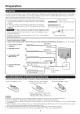
1 Confirm that there are 12 screws (all the same size)
supplied with the stand unit.
????
2 (1) Set the post for the stand unit onto the box.
(_) Attach the base to the post.
13}Insert and tighten the 8 screws into the 8 holes
on the bottom of the base.
o Hold the stand unit securely with one hand, and then tighten
the screws.
®
3 ,'1 Insert the stand into the openings on the bottom
of the TV.
,_2} Insert and tighten the 4 screws into the 4 holes
on the rear of the TV.
• To detach the stand, perform the steps in reverse order.
" • J" e| |" _ .
• This TV should be mounted on the wall only with the
AN-52AG4 (SHARP} wail mount bracket. The use of
other wall mount brackets may resumt in an unstaMe
installation and may cause serious injuries.
• Installing the TV requires special skill that should
only be performed by qualified service personnel.
Customers should not attempt to do the work
themselves. SHARP bears no responsibility for
improper mounting or mounting that results in
accident or injury.
Using an optional bracket to mount the TV
• You can ask a qualified service professional about
using an optional AN-52AG4 bracket to mount the TV
to the wall.
Carefully read the instructions that corrle with the
bracket before beginning work.
Hanging on the wall
AN-52AG4 wall mount bracket.
(See the bracket instructions for details.)
---- ---__........... ----_
Vertical mounting Angular mounting
About setting the TV angle
015110115120° e The center of the display:
...... " _'s/_4inch (12.9 mm} above the "c'
/ position.
* Refer to the operation
manual of AN-52AG4 for
details.
• Detach the cable clamp on the rear of the TV when using
the optional mount bracket.
• To use this TV mounted on a wall, remove the covers at
the 4 locations on the rear of the TV, and then use the
screws supplied with the wall mount bracket to secure the
bracket to the rear of the TV.