
Manual





Appendix
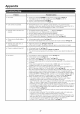
Problem
o NO picture
o Picture quality of HD programs is
poor.
o The TV sometimes makes a
cracking sound.
Possible Solution
o Is connection to other components correct? _ Page 11
o is the correct input signal type selected in "input Select" atter connection?
Page 24
o Is the correct input selected? _ Page 15
o is "On" selected in "Audio One/"? _ Page 24
o if the PC image is not displayed, check the following:
When connecting a laptop PC to the TV, check that display output mode of the
PC is set to external monitor.
Check the resolution setting on the PC. Is a non compatible signal being input?
=_Page 30
o To enjoy HD images from external equipment, you are required to set up HDMI
connection or component connection.
o if the program content is not of HD quality, HD images cannot be displayed. Check
that the program you are viewing provides HD images.
o The HD cable/satellite set top box may need to be con%ured to output HD images
via cable/satellite.
o The cable/satellite broadcast may not support a signal resolution ot 1080p.
o This is not a malfunction. This happens when the cabinet slightly expands and
contracts according to change in temperature. This does not affect the TV's
pertormance.
iiiiiiiiiii.....
The example of an error message Error code Possible Solution
displayed on a screen
E202 o Check the antenna cable. Check that the antenna iscorrectly
o Failed to receive broadcast.
setup.
o No broadcast now. E203 o Check the broadcast time in the program guide.
o An incompatible audio signal has -- o This message is displayed when an audio format other than
been received. Change the output PCM is input. (Dolby Digital and DTS audio formats are not
device audio settings to PCM. supported.)
Set the audio output tormat of connected external HDMI
equipment to PCM.
Refer to the operation manual of the external equipment tor
setting details.
Cautions regarding use in high and low temperature environments
o When the unit is used in a low temperature space (e.g. room, office), the picture may leave trails or appear slightly delayed.
This is not a malfunction, and the unit will recover when the temperature returns to normal.
o Do not leave the unit in a hot or cold location. Also, do not leave the unit in a location exposed to direct sunlight or near a
heater, as this may cause the cabinet to deform and the Liquid Crystal panel to malfunction.
h Storage temperature: -4°F to I 140°F - 20°C to I 60°C
CLEARING THE SECRET NUMBER
if you forget the secret number, clear the secret number using the following procedure.
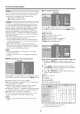
1 Select an item from the list below to display the secret number input screen. (For operating the on-screen
display menu, see page 17.)
* "EZ Setup", "CH Setup", "Parental CTRL" or "Reset" on the Setup menu.
* "Color System" on the Option menu.
* "Software Update" on the Digital Setup menu.
2 Press and hold both CHfx and VOL+ on the TV simultaneously until the message appears on the screen.
The secret number is I I I I I
M
o As a precautionary measure, make a note ot your secret number above, cut it from this manual, and keep it in a sate place.
28