
Manual




On-Screen Display Menu
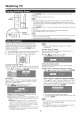
Produces a clearer video irrlage.
Auto: Automatbally adjusts the level of noise reduction.
High/Middle/Low: Select a desired level tot viewing a
clearer video image.
Off: No adjustment.
o "Digital Nobe Reduction" is not available during PC tormat
input.
¥/¢ ...........................................................................................................................................................................................................
Provides high quality images with minimal dot crawl
and cross color noise.
Slow: For still images.
Standard: Normal adjustment.
Fast: For moving images.
o "3D Y/C" is available tot input signal from Composite Video
and analog broadcasts (air and cable).
For viewing a video in monochrorne
On: For viewing in monochrome.
Off: Normal color.
The brightness level range of the OPC sensor's autornatb
adjustments can be set according to your preferences.
The adjustment range of the OPC sensor can be set to
a maximum of +16 and a minimum of-16.
Max.: -15 through +16
Min.: 16 through +15
o The "Range of OPC" settings are active only when "OPC" is
set to "On".
o The maximum setting cannot be set to a smaller number
than the minimum setting.
o The minimum setting cannot be set to a bigger number
than the maximum setting.
o Depending on the brightness of the surrounding light, the OPC
sensor might not operate ifthe adjustment range is small.
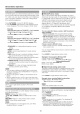
You can adjust the sound quality to your preference
with the following settings.
Treble For weaker treble
Bass For weaker bass
Balance Decreaseaudio from
the right speaker
For stronger treble
For stronger bass
Decreaseaudio trom
the left speaker
o Audio menu is grayed out when "Output Select" is set to
"Variable". (See page 24.)
o For resetting all Audio adjustment items to the tactory
preset values, press ,I./T to select "Reset", press ENTER,
press 41/_- to select "Yes", and then press ENTER.
The surround function produces Surround effect from
the speakers.
On: Makes it possible to enjoy natural, realistic surround
sound.
Off: Outputs the normal sound.
o Audio menu is grayed out when "Output Select" is set to
"Variable". (See page 24.)
o For some discs, setup may be required on your DVD player.
In this case, please refer to the operation manual of your
DVD player.
This function allows you to enjoy bass-enhanced sound.
On: Bass Enhancer function is on.
Off: Normal sound.
• Audio menu is grayed out when "Output Select" is set to
"Variable". (See page 24.)
Power control setting allows you to save energy.
This function allows you to set the Power Saving level
in order to decrease the power consumption and
increase the backlight lifespan.
Standard: Optimizes power reduction based upon video
content. Whenset to "Standard","_" appearson the screen.
Advanced: Optimizes power reduction based upon video
content and engages OPC. When set to "Advanced",
"_j]" appears on the screen.
Off: This function does not work.
o "Power Saving" does not function when you set AV MODE
to "AUTO" or "DYNAMIC (Fixed)".
o You cannot select a different Power Saving item for each
AV MODE.
When "Power Saving" is set, the "OPC" settings for all AV
Modes will automatically change.
--If you set "OPC" to "On" when "Power Saving" is set
to "Standard", then the "Power Saving" setting will
change to "Advanced".
--When you change the "Power Saving" setting from
"Advanced" to "Off" or to "Standard", "OPC" will be set
to "Off".
-- "AUTO" and "DYNAMIC (Fixed)" will remain set to "Off".
o When "Power Saving" is set to "Standard" or "Advanced",
the Power Saving leaf icon appears to the left of "OPC" in
the Picture menu screen.
_!_ • _t .......
When set to "Enable", the power will automatically shut
down if there is no signal for 15 minutes.
o When it is 5 nllnutes before the power shuts down, the
remaining time will start to keep appearing every minute,
o "Disable" is the factory preset value.
o When a TV program tinlshea, this function may not operate.
19