
Manual




On-Screen Display Menu
, =
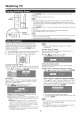
Adjusts the pbture to your preference witlq the
following picture settings.
Backlight The screen dims The screen
brightens
Contrast For less contrast For more contrast
Brightness For bss For more
brightness brightness
Color For bss color For more color
intensity intensity
Tint Skin tones Skin tones
become reddbh become greenish
Sharpness For less For more
sharpness sharpness
For resetting all Picture adjustment items to the factory
preset values, press _./T to sebct "Reset", press ENTER,
press 41/1_ to sebct "Yes", and then press ENTER.
Automatically adjusts the brightness of the screen.
Off: The brightness is fixed at the vahJeset in "Backlight".
On: Automatically adjusts.
On: Display: Displays the OPC effect on the screen whib
adjusting the brightness of the screen.
o When set to "On", the Optical Picture Control (OPC) senses
the surrounding light and automatically adjusts the bacHight
brightness. Make sure nothing obstructs the OPC sensor,
which could affect its ability to sense surrounding light.
o When set to "On: Display", OPC effect displays on the
screen whib the OPC adjusts the screen brightness.
o When set to "On" or "On: Display", the OPC indicator on
the TV lights green.
This TV provides various advanced functions for
optimizing the picture quality.
Color tone is managed using the six-color adjustment
setting.
C.M.S.-Nue: This is a standard to adjust the color either
more reddish or more bluish intone.
C.M.S.-Sataration: increases or decreases the
saturation of a selected color.
C,M.S.-Value: A higher vahJemakes the image brighter.
A lower value makes the image darker.
o For resetting all adjustment items to the tsctory preset values,
press A/T to select "Reset", and then press ENTER.
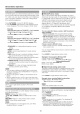
For a better white balance, use color temperature
correction.
Nigh: White with bluish tone
Mid-High:
Middle:
Mid-Low:
Low: White with reddish tone
White balance can be adjusted between a maximum of
+30 and a minimum of-30 for each color temperature.
R Gain (LO/NI): 30 through +30
G Gain (LO/NI): -30 through +30
B Gain (LO/HI): 30 through +30
o For resetting all adjustment items to the tactory preset values,
press A/_' to select "Reset", and then press ENTER.
Use Fine Motion Enhanced to view fast-action video
more clearly.
On: For obtaining a clearer image.
Off: Normal image.
o "Fine Motion Enhanced" may cause image noise. If this
occurs, turn the tunction "Off".
Automatically adjusts the irrlage contrast according to
the scene.
On: Automatically adjusts the image contrast.
Off: No adjustment.
Adjusts the differences of picture tones between bright
parts and dark parts. The adjustment range of the
gamma can be set to a maximum of +2 and a minimum
of-2 by pressing _1 or I1_.
Adjusts on-screen black level to your preferred level.
Nigh: The black level gets brighter.
Low: The black level gets darker.
o "Black Level" is available tor input signal from Composite
Video, Component 480i and analog broadcasts (air and
cable).
Autornatical_/detects a film-based source (originally
encoded at 24 frames/second), analyzes _tthen recreates
each still film frame for high-definition picture quality.
Advanced(High)/Advanced(Low}: Select a desired level
to remove jerkiness from film contents.
Standard: Detects, analyzes, converts film source.
Off: Normal viewing mode.
o "Film Mode" does not function when you set AV MODE to
"GAME".
o "Standard" does not function when channel display shows
an input signal resolution of 480p, 720p or 1080p.
• "Film MODE" is not available during PC format input.
18