
Manual

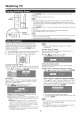



On-Screen Display Menu
Example _ LCFONT embedded
®
Example
[_/] Option
®
_The bar above is an operational guide for |
i
the remote control. The bar will change in
J
. accordance with each menu setting screen.
1 Press MENU to display the MENU screen.
2 _ Press 41/1_ to select the desired menu.
Press A/T to select a specific adjustment item,
and then press ENTER.
Press _l,/T (or 4/1_) to select or adjust the
desired setting, and then press ENTER.
3 Press MENU to exit.
Item displayed in yellow
o This indicates the item currently selected.
o Press ENTER to go to the adjustment screen for this
item.
Item in brackets
o This indicates the current setting for the item.
Item displayed in white
o This indicates that the item can be selected.
Item displayed in gray
o This indicates that the item cannot be selected.
There are various reasons why the items cannot be
selected, but the main reasons are as follows:
--Nothing is connected to the selected input terminal.
--The function is not compatible with the current input
signal.
o Menu options difter in the selected input modes, but the operating procedures are the same.
o The screens in the operation manual are for explanation purposes (some are enlarged, others cropped) and may vary slightly
from the actual screens.
LOFONT:
o This product is embedded with LC Font technology, which was developed by SHARP Corporation tor clearly displaying easy
to read characters on LOB screens.
h,
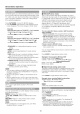
Using the remote control Using the control panel of the main unit
Use the following buttons on the remote control to You can also operate the menu with the control panel
operate the menu. of the main unit.
Button operations on the control panel correspond to
the ones on the remote control as shown below.
MENU: Press to open or close the mena screen.
,_./T/4/_ : Press to select a desired item on the screen or
adjust a selected item.
ENTER: Press to go to the next step or complete the
setting.
RETURN: Press to return to the previous step.
MENU: MENU on the remote
control.
INPUT: ENTER on the remote
control.
CH/X/V: Cursor _t./T on the
remote control
VOL +/-:Cursor 41/t,- on the
remote control
17