
Manual




Connecting to External Equipment
You can connect many types of external equipment to your TV. To view external source images, select the input
source from INPUT on the rernote control unit or on the TV. (See page 15.)
For connecting the TV to external equipment, use commercially available cables.
The illustrations of the terminals are for explanation purposes and may vary slightly from the actual products.
• To protect equipment, always turn off the TV before connecting any external equipment.
• Please read the relevant operation manual (Blu-ray disc player, etc.) carefully before making connections.
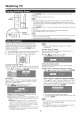
[] Connecting a Biu-ray Disc Player, DVD Player, Cable/Satellite Set-top Box, VCR, Game Console or Camcorder
Terminalon external
equipment Cable Terminal on the TV
HD [¢_[(_j. INPUT 5, 6 or 7 Hi_ml '1
Qualil _ - HDMFcertified cable _Z:I/_ j] *3
HiClml DVFHDMI conversion cable '-
® ......_ ............................ _o ®
DWOUT AUDIO e 3.5 mm stere<)minijack cable AUDIO AUDIO
*3
_ _ Component vid ..... ble INPUT1 or2 yCp(_p(_ *4
_MP0_E_T
AUDI O "-_ %=4_FJ I u I ,
L_ _R AV cable INPUT1 or3 *4
Standard .............. _ _L-_ _,_-_ R
Quality
"1 Supported Audio format: Linear PCM, sampling rate 32/44.1/48kHz.
•2 When using a DVFHDMI conversion cable, you should make an analog audio connection. In this case, in addition to
connecting a DVI-HDMI conversion cable to the INPUT 6 (HDMI) terminal, connect a e 3.5 mm stereo minijack cable to the
AUDIO tem%al and set "PC Audio Select" to "Input 6 (HDMI)". (See page 24.)
•3 To enjoy 1080p display capability, connect your external equipment using an HDMFcertified cable or a component cable
and set the equipment to 1080p output.
•4 The COMPONENT tem_inals take priority over the VIDEO terminal (INPUT 1 only).
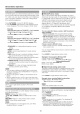
[] Connecting an Audio AmpEfier
Terminalon external
equipment Cable Terminalon the TV
DIGITAL AUDIO ,_j_ *5
,_ Optical fiber ()able {i_ OUTPUT
_ _e_R Audio cable OUTPUT _ _ *6
"5 Depending on the connected equipment, audio will not output from the DiGiTAL AUDIO OUTPUT terminal in HDMI
connection. In this case, set the audio formate of the connected equipment to PCM, 32/44.1/48 kHz.
•6 See page 24 for details on the Output Select function.
[] Connecting a PC
Terminal on PC Cable Terminal on the TV
Analog RGB cable (D-sub 15-pin ()able orVGA cable) INPUT 4 *7
_) o 3.5 mm stereo minijack ()able ®
AUDIO <_1 ..... ._ AUDIO AUDIO
IN PUT 5, 6 or 7 HiClm! *8
_ _rf_[-:_ e HDMbcertified cable <_
HBIlrlll !_1]-- r DVFHDMI conversion ()able
® _ ............................ ®
DV_OUT AUDIO e 3.5 mm stere() minijack cable AUDIO
AUDIO
•7 When connecting a PC to the INPUT 4, set "PC Audio Select" to "input 4 (PC)". (See page 24.)
•8 Depending on the board, only video signals may be output, h_this case, in addition to connecting an HDMI certified cable to the
INPUT 6 (HDMI) terminal, connect a e 3.5 mm stereo minijack cable to the AUDIO terminal and set "PC Audio Select" to "Input 6
(HDMI)". (See page 24.)
The HDMI tem_inals only support digital signal
Refer to page 30 for a list of PC signals compatible with the TV.
11