
Manual




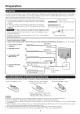


Part Names
f_- Remote contro sensor _
II / / ' ....... OPC ....... *(Seepage 18.) /
.... _ i V- OPC indicator (See page 18.) /
_, ..........................................................._ ........... _ _ POWER_
* OPC: Optical Picture Control
"1
AC INPUT
terminal
ANT/CABLE _ .Antenna!Gable in
_" ] OUTPUT ternsinals
I ,NPUTlterm,na,s
,NPUT term,na,s
__ _DIQITAL AUDIO
__ kll_rljl OUTPUT terminal
_, j _ -- _ J erminal (PC iN)
AUDIO terminal (shared for INPUT 4 and INPUT 6) *4
L.--i NPUT 6 term na HDM
-- iNPUT 7 terminal (HDMI)
'1
INPUT5 INPUT3 SERVICE
terminal terminals terminal
(HDMI)
"1 See page 11 for external equipment connection.
*2 See pages 12 and 17 for button operations.
*3 See page 8 for connecting the AC cord.
*4 See page 24 for details on the PC Audio Select function.
-- POWER button
-- MENU button
-- INPUT button
-- Channel buttons (CN/X,/V)
-- Volume buttons (VOL +/-)
• The illustrations in this operation manual are for explanation purposes and may vary slightS/from the actual operations.
10