
Specifications



<P=002>
3
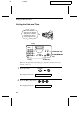
Press the START/MEMORY key.
START/MEMORY
The display will show:
ENTER FAX #
4
Enter your fax number by pressing the number keys. Up to 20 digits
can be entered.
•
••
•
To insert a space between digits, press the # key. To insert a "+",
press the * key.
•
••
•
If you make a mistake, press the HOLD/SEARCH key to move
the cursor back to the mistake and then enter the correct number.
The new number will replace the old number.
Example:
55
5
2
1 43
Cursor: A dark square mark in the display that indicates where a number
or letter will be entered.
5
Press the START/MEMORY key to enter the fax number in
memory.
START/MEMORY
The display will show:
ENTER YOUR NAME
6
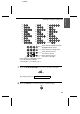
Enter your name by pressing the number keys as shown in the
following chart. Up to 24 characters can be entered.
•
••
•
To enter two letters in succession that require the same key, press
the SPEAKER key after entering the first letter to advance the
cursor.
Example: SHARP = 7 7 7 7 7 4 4 4 2 2 7 7 7 7 7 7
SPEAKER
Entering Your Name and Fax Number
26