
Quick Start Guide


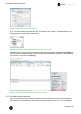
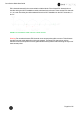


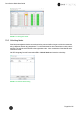
Table Of Contents
- 1 Electronic Shelf Labeling – A brief introduction
- 2 Label Family Introduction
- 3 Get the latest software and documentation
- 4 Core Appliance
- 5 Core Appliance initial setup
- 6 Start SES-imagotag Core Service and SES-imagotag Control Center
- 7 ESL Access Point Configuration
- 8 Selecting channels
- 9 Setup Security
- 10 Register labels
- 11 Start tagging
- 12 Templates
- 13 Integration
- 14 Troubleshooting
- 14.1 SES-imagotag Core Service Dashboard
- 14.2 Running the SES-imagotag Core Service as a background service
- 14.3 Where can get a demo/development license key?
- 14.4 Deleting the demo articles
- 14.5 Establish a network configuration when no DHCP is available – Step by step
- 14.6 Access point discovering with Bonjour Services
- 14.7 What can I do if the Status LED of the AP-2010 access point doesn’t turn blue?
- 14.8 Labels don’t come online
- 14.9 The encryption does not work
- 14.10 Unlocking labels
- 14.11 Starting Java applications
- 14.12 Encoding problems
- 14.13 Reserve RAM for Java heap space
- 14.14 Further documentation

Core Service Quick Start Guide
Page 21 of 45
FIGURE 1-15: LANCOM Web GUI Login
7.2.3 Configuration: Wireless ePaper
Under “Configuration – Wireless ePaper” you can check whether the module is activated or not. You
can also select an ESL channel or leave the “Automatic selection” .
FIGURE 1-16: Configuration - Wireless ePaper
The LANCOM access point supports 11 wireless ESL channels. It’s recommended
choose one of the recommended ESL channels: 3, 5, 8, 9 or 10 first. These
channels are scanned by the labels more often.
7.2.4 LCOS Menu Tree
Here you’ll find the necessary information for the SES-imagotag Core Service Access Point
Configuration settings.
7.2.5 Setup – Wireless ePaper
Navigation: “LCOS Menu Tree – Setup – Wireless ePaper”
It’s possible to change the ESL channels and do activate or deactivate the Wireless ePaper system.
Here you can also find the selected UDP port for the communication (port 7353 per default).
FIGURE 1-17: LCOS Menu Tree - Setup - Wireless ePaper
The SES-imagotag Core Service will listen to TCP connections on Port 8000, 8001
and also UDP connections on Port 8000 and the port set in LCOS Menu Tree
(default 7353). Please make sure that there is no firewall issue and/or interference
with other systems.