
Operation Manual




40 Web Site Design and Construction
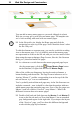
Browser Window
(“safe area”)
Page
The Web page viewer initially sees only what’s displayed in the
browser window (the so-called safe area), leaving unseen an
indeterminate portion of the page below that. At 800x600 resolution,
allowing for browser toolbars and such, the safe area may be around
400 vertical pixels of actual page height. Content in this region will be
all the visitor sees at first. In fact, studies show that many Web users
are not in the habit of scrolling pages before deciding to move on, so
that leaves a fairly narrow strip and a short interval in which to grab
their attention!
♦ Content. The safe area should convey essential information about
the site and entice the visitor to scroll for more.
♦ Composition. Think of the safe area as a mini-page, and make
sure that the elements within it work as a group.
In general, Web page headers and footers need to contain more
information than those in a conventional site. The Web site title, which
appears immediately in the browser’s title bar as the first page loads,
should convey your site’s identity accurately, and even with a touch of
wit. The top matter should include a logo or other identifying motif, as
well as a page title (so users know they’ve come to the right place).
Visual cues as to section and level can also be part of the top matter.
The bottom of the page is a good place to include elements that help the
page stand on its own as a self-contained unit. For example, it’s good
practice to include a date stamp so users know how current the
contents are (use Insert/Information/Date or Time... and uncheck
Update Automatically).