
Operation Manual




Getting Started 21
Note that WebPlus displays one page of the six-page publication at a
time.
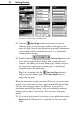
On the right side of the WebPlus window, you’ll see the new Studio—
actually a cluster of seven special-purpose panels. Let’s preview them
in sequence. Click each panel’s name to display it...
Y The &RORUV panel (see below) lets you apply color and/or
shading to an object.
Y The &RORU6FKHPHV panel displays a list of available color
schemes that let you instantly revise colors in a Page Wizard
publication. You can extend a color scheme to new elements,
customize scheme colors, or create entirely new schemes!
Y The 7H[W panel (see below) provides a visual preview and lets
you change the style and font of text objects.
Y The /LQHV panel (see below) lets you set the weight and type of
lines and shapes.
Y The *DOOHU\ includes a wide variety of predesigned
elements—graphics that you can drag and drop, then
customize or use as a starting point for your own designs.
Y The 3RUWIROLR is a container for storing design objects
(pictures, text blocks, and even unlinked text frames) you'd
like to reuse in different publications.
Y The :L]DUG panel lets you edit Gallery objects (see above) or
revisit choices you made when creating a publication using a
Page Wizard. And that’s exactly what we’ll do in a moment...