
Operation Manual




Tables, Charts, and Calendars 73
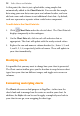
To display the Charts tab:
• At the bottom of your right-hand tab group, click Charts.
The tab offers three buttons called Chart, Axes, and Series.
• Chart: Used for title and series legend control and positioning.
Other options are the same as provided on the Chart context
toolbar.
• Axes: The Axes section adds axis-specific titles, labels, guides, and
any other chart elements that aid the interpretation of chart data.
• Series: Modifies individual series, including manually assigning
series labels, series plotting, enabling trendlines, error bars, and
value labels.
Inserting a calendar
The Calendar Wizard helps you design month-at-a-glance calendars for
use in your publication, with optional addition of personal events and
public holidays.