
Operation Manual




Pages 31
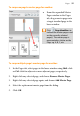
To swap one page's master page for another:
• From the expanded Master
Pages window in the Pages
tab, drag a master page onto
a target standard page in the
lower window.
Click Page Identifiers to
indicate the master pages used
on the currently selected
page(s). The master page is
represented as a letter on the
Page, e.g. A, B, C, etc.
To swap multiple page's master page for another:
1. In the Pages tab, select pages in the lower window using Shift-click
or Ctrl-click for adjacent or non-adjacent pages, respectively.
2. Right-click any selected page, and choose Remove Master Pages.
3. Right-click any selected page again, and choose Add Master Page.
4. Select the replacement master page from the dialog.
5. Click OK.