
Operation Manual




28 Pages
To delete a single page/master page:
1. On the Pages tab, select the page (or master page) to delete on the
appropriate window by clicking its thumbnail.
2. Click
Delete Page/Remove Master Page.
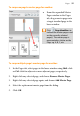
To rearrange pages:
• On the Pages tab, in the lower Pages window, drag a page
thumbnail over another page thumbnail in the page sequence. The
page is added after the hovered over page thumbnail.
Adding more template pages
Use the Assets tab's Asset Browser if you're looking to use some
additional template pages in your publication. See Browsing on p. 41.
You can drag-and-drop a page to replace (or add before/after) your
current page.
Currently used pages can be stored for future use by clicking Add on the
Assets tab's Pages category. See Storing designs in PagePlus Help.