
Operation Manual






94 Text
Using multi-level lists
For multi-level lists you can set a different
character (symbol, text or number) to
display at each level of your list. Levels are
normally considered to be subordinate to
each other, where Level 1 (first level),
Level 2 (second), Level 3 (third), etc. are
of decreasing importance in the list. For
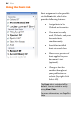
example, the simple multi-
level numbered
passage of text opposite is arranged at
three levels.
If you apply a multi-level preset to a range of text you'll get a list with the
preset's Level 1 format applied by default. Unless you use text styles,
you'll have to change to levels 2, 3, 4, etc. to set the correct level for your
list entry.
Changing list levels on selected paragraphs:
• Click the
Increase Paragraph Indent or Decrease
Paragraph Indent button on the Text context toolbar to
increment or decrement the current level by one.
The multi-level presets offer some simple but commonly used schemes
for paragraph list formatting. However, if you want to create your own
lists or modify an existing list (your own or a preset), use the Details
button in the Text Style dialog when Multi-Level style is selected. See
PagePlus Help for more details.