
Operation Manual






92 Text
In addition, you can specify the Distance from text: the "standoff"
between the object's wrap outline and adjacent text. (The wrap outline is
a contour that defines the object's edges for text wrapping purposes.)
Different object types have different initial wrap outlines.
You can manually adjust the wrap outline using the Curve context
toolbar for more precise text fitting. See PagePlus help for more
information.
Creating a bulleted or numbered list
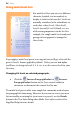
You can turn a series of paragraphs into bulleted, numbered or multi-
level lists. Bullets are especially useful when listing items of interest in
no specific order of preference, numbered lists for presenting step-by-
step procedures (by number or letter), and multi-level lists for more
intelligent hierarchical lists with prefixed numbers, symbols, or a mix of
both, all with supporting optional text (see Using multi-level lists on
p. 94).
Bulleted list
Numbered list
Multi-level list
Lists can be applied to normal text (as local formatting) or to text styles
equally.
To create a simple bulleted or numbered list:
1. Select one or more paragraphs.
- or -
Click in a paragraph's text.