
Operation Manual






Text 87
Using text styles
PagePlus lets you use named text styles (pre-defined or user-defined),
which can be applied to frame text, table text, artistic text, index text or
table of contents text. A text style is a set of character and/or paragraph
attributes saved as a group. When you apply a style to text, you apply the
whole group of attributes in just one step. For example, you could use
named paragraph styles for particular layout elements, such as "Heading
1" or "Body", and character styles to convey meaning, such as
"Emphasis", "Strong", or "Subtle Reference".
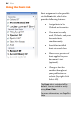
Styles can be
applied to
characters or
paragraphs using
either the Text
context toolbar or
the Text Styles tab.
Both paragraph
and character
styles can be
managed from the
Text Style Palette.
Text style hierarchies
All paragraph or character text styles available in PagePlus are ultimately
based on the respective Normal and Default Paragraph Font text styles.