
Operation Manual




Working with Objects 81
To uncrop (restore full visibility):
• Click the Remove Crop button on the Attributes toolbar's Crop
flyout.
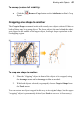
Cropping one shape to another
The Crop to Shape command works with exactly two objects selected. Either or
both of these may be a group object. The lower object (the one behind the other)
gets clipped to the outline of the upper object, leaving a shape equivalent to the
overlapping region.
To crop one shape to another:
1. Place the "clipping" object in front of the object to be cropped, using
the Arrange menu and/or Arrange toolbar as needed.
2. With both objects selected (or grouped), choose Crop to Shape from
the Tools menu.
You can restore an object cropped in this way to its original shape, but the upper
"cropping" object is permanently deleted (use Undo to recover it if necessary).