
Operation Manual




42 Working with Pages
An easy method for navigating from the selected master page to a last visited
page is the Return to feature.
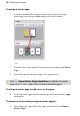
To jump to a page from a master page:
1. Select the master page in the Pages tab.
2. In the Layers tab, right-click any layer and choose Return to 'x of y',
where x is the last visited page and y is the total number of pages. The
last visited page is displayed.
Facing pages and dual master pages
If you're using multi-page regular/booklet publications, you can assign different
master pages to the left and right publication pages (also called spreads) if
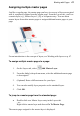
necessary—master pages are assigned per page and not per spread. For example
(see below), a left-hand "body text" page might use the left-side component of
one master page (A), while a right-hand page could use the right side of a
different master page (B).
Editing master page objects
If you're editing pages which use master pages, master page objects will
contribute to your page design. These objects can be edited quickly and easily
from the page by using a control bar under the selected object.