
Operation Manual




40 Working with Pages
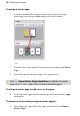
To assign a master page:
1. From the expanded Master Pages window in the Pages tab, drag a
master page onto a target standard page in the lower window.
- or –
1. From the Layers tab, right-click a master layer and choose Set Master
Page....
2. Select the page and the master page to be assigned to it.
Click Show Master Page Identifiers to indicate the master
page (A, B, C, etc.) used on the currently selected page(s).
To assign a master page to odd, even, or all pages:
• In the Pages tab, right-click the master page and select from the Apply
to submenu.
To disconnect a previously assigned master page(s):
• In the Pages tab, right-click in the Pages window and select Remove
Master Pages.