
Operation Manual






190 Pictures, Lines, and Shapes
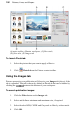
(A) main toolbar, (B)main workspace, (C)filter stack,
(D) filter tabs, (E) Images tab
To launch PhotoLab:
1. Select the picture that you want to apply a filter to.
2. Click PhotoLab on the Picture context toolbar.
Using the Images tab
Pictures present in your publication will show in your Images tab (above) if the
tab is expanded. This tab is shown by default in PhotoLab but can be hidden by
clicking the button at the bottom of your workspace.
To search publication images:
1. Click the Filter button on the Images tab.
2. Select and define a minimum and maximum size, if required.
3. Select/deselect RGB, CMYK and Greyscale to filter by colour mode.
4. Click OK.