
Operation Manual




Fills, Lines, Colours, and Transparency 93
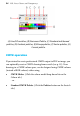
The Colour tab has several models available from a drop-down list—
HSL Colour Wheel (shown), HSL Colour Box, HSL Sliders, RGB Sliders,
RGB Sliders (Hex), CMYK Sliders and Tinting.
(A) Line/Fill swatches, (B) Colour Picker, (C) Colour Model, (D) Hue wheel,
(E) Saturation/Lightness triangle.
On the HSL Colour Wheel, the small circles shown in the wheel and
triangle indicate the current setting for hue and saturation/lightness,
respectively. Drag either circle around to adjust the values.
The Line/Fill swatches on the tab govern whether the selected colour is
applied as a line colour, solid fill, or both simultaneously.
By comparison, the Swatch tab hosts a vast array of preset colour
swatches for solid, gradient, plasma, vector and bitmap fills. Swatches
are stored in palettes which can be managed from within the tab. You
can even create your own palettes and palette categories.