
Operation Manual






Working with Objects 81
Aligning and distributing objects
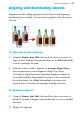
Alignment involves taking a group of selected objects and aligning or
distributing them, or both—the operation is applied to all of the objects
selected.
To align two or more objects:
1. Using the Pointer Tool, Shift-click on all the objects you want to
align, or draw a marquee box around them (or use Edit>Select All),
to create a multiple selection.
2. From the context toolbar, Align tab, or Arrange>Align Objects,
select an option for vertical alignment (Align Top, Centre
Vertically, or Align Bottom) or horizontal alignment (Align Left,
Centre Horizontally, Align Right) of an object. Object means the
last selected object for a Shift-click multiple selection or the
topmost object in Z-order for a marquee multiple selection.
To distribute objects:
1. Using the Pointer Tool, Shift-click on all the objects you want to
distribute, or draw a marquee box around them, to create a multiple
selection.
2. Display the Align tab.