
Operation Manual




34 Lines, Curves and Shapes
4. Click once to add the first control point.
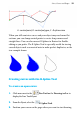
5. On the page, position the cursor at the next point.
A polygon line extends from the current point.
6. Click once to add a second point.
A straight B-spline curve is added to the page and follows the
polygon line.
To draw a sharp corner or a straight line, press the Alt key.
7. Position the cursor at the next point.