
Operation Manual




Lines, Curves and Shapes 33
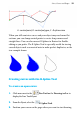
A - control point, B - control polygon, C - B-spline curve
When you still want nice curves and your object may need some flat
sections, you can clamp control points to create sharp corners and
straight lines. You can also convert B-Splines to Beziers for flexible
editing as you prefer. The B-Spline Tool is especially useful for tracing
curved objects such as a musical note to make perfect duplicates, or the
tear example shown.
Creating curves with the B-Spline Tool
To create an open curve:
1. Click arrow next to the
Pen Tool on the Drawing toolbar to
display the Line Tools flyout.
2. From the flyout, select the
B-Spline Tool.
3. Position your cursor on the page where you want to start drawing.