
Operation Manual




32 Lines, Curves and Shapes
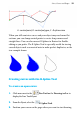
2. Using the node cursor, click on an end node and drag the curve
onto the other end node and release the mouse button to create a
shape.
If you're trying to draw an outline made up
of many independent curves (e.g., a cartoon
ear, rose, etc.) and you want to retain the fill
colour, you can fill each curve without
closing them. This is made easy by using
the Fill-on-Create feature.
To fill an unclosed curve automatically:
1. Select the Pencil Tool, Pen Tool, or Brush Tool.
2. Enable
Fill-on-Create from the context toolbar, and select a
suitable fill from the Colour tab. You'll also need to ensure Select-
on-Create is enabled on the context toolbar (Freehand and Brush
tools only).
3. Draw a freeform line, pen line, or brush stroke into a curve. The
resulting curve is filled with the current fill colour.
Drawing B-Spline curves
The B-Spline Tool draws smooth curves when you create open or closed
shapes. B-spline, also known as Basis spline, uses a mathematical
formula. It is this calculation that produces really nice elegant curves.
When you use the B-Spline Tool, control points are connected together
as you draw and a polygon is constructed. The polygon controls the
position and direction and calculates the smoothest possible curve
between two points on the page.