
Operation Manual




28 Lines, Curves and Shapes
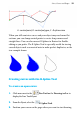
Note the little squares indicating its nodes—at the two ends, and at
each point where two line segments come together.
4. (Optional) To set the degree of smoothing to be applied to the line
(and subsequent lines), set the Smoothness value on the context
toolbar above your workspace.
To draw a straight line:
1.
From the Drawing toolbar's Line Tools flyout, click
the Straight Line Tool.
2. Click where you want the line to start, and drag to another point
while holding down the mouse button, then release the mouse
button. The straight line appears immediately.