
Operation Manual



78 Lines, Curves, and Shapes
Connectors
Connectors are special
lines that you can
anchor to objects,
where they remain
attached even if one or
both objects are
moved or resized.
Using connectors, you
can easily create
dynamic diagrams
and charts that show
relationships, such as
family trees,
organization charts,
and flow charts. If you
need to rearrange the
elements, the
connections are
preserved.
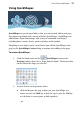
Try the Gallery tab (Office folder) for flow chart (above), network,
and organization chart symbols, then simply add connectors
between objects.
A key feature of connectors is that if you move any connected object at a later
date, the connectors will follow.