
Operation Manual


Applying Special Effects 209
3. Select a thumbnail in the chosen category. You may need to expand a
subcategory by clicking Expand.
4. The effect is applied to the object.
Applying bevels and embossing effects
You can apply some depth to your objects by
applying an embossing effect.
• From the Styles tab, adjust the Bevel
& Emboss setting on your selected
object. The greater the value, the
greater the embossed effect.
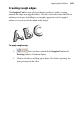
Applying feathered edges
Feathering applies a softer
edge to your objects, such as
embellishments or cut
materials. The effect is
especially useful for
presenting a photo on the
page.
• From the Styles tab, pick a Feather Edge setting. This is the distance
inside the object's outline within which feathering will be applied.