
Operation Manual


Applying Special Effects 203
Creating rough edges
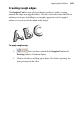
The Roughen Tool lets you selectively distort an object's outline, turning
smooth-line edges into jagged outlines. The effect can lend cartoon-like flair to
ordinary text or give QuickShapes an irregular appearance, in fact apply it
whenever it seems to suit the mood of the design.
To apply roughening:
1. Select an object and click the Roughen Tool on the
Drawing toolbar's Transform flyout.
2. Click on the object and drag up or down. The further you drag, the
more pronounced the effect.