
Operation Manual




Working with Objects 133
Using the Arrange tab
Instead of using the ShapeBuilder Tool, you have the option of using the
selection-based Combine tool or "Join" tools such as Add, Subtract, and
Intersect.
To combine or join shapes (using Arrange tab):
• Select two objects and choose a tool for the Arrange tab.
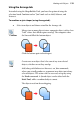
Combine
Merges two or more objects into a composite object, with a clear
“hole” where their filled regions overlap. The composite takes
the line and fill of the bottom object.
Click the button again to break apart.
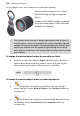
Add
Creates one new object that’s the sum of any two selected
objects, whether or not they overlap.
Add, along with Subtract an Intersect, are Join commands,
where you actually produce a permanent new object out of any
selected objects. The action can’t be reversed, except by using
the Undo command. A Joined object can be edited with the
Node Tool, while a combined object cannot.
The objects need not be overlapping.