
Operation Manual





Working with Text 99
Entering text
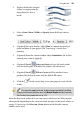
You can create different types of text in DrawPlus, i.e., Artistic Text, Frame
Text, or Shape Text, all directly on the page.
Artistic Text
Frame Text
Shape Text
It's easy to edit the text once it's created, by retyping it or altering properties like
font, style, and point size.
In general, artistic text (as an independent object) is better suited to decorative
or fancy typographic design, frame text is intended for presenting text passages
in more traditional square or rectangular shaped blocks; shape text lends itself so
well to blocks of body text where shape and flow contribute to the overall layout.
Artistic text behaves more independently than Shape and Frame Text and its
individual letters can be stretched, rotated, sheared, enveloped, and combined
with other objects. Shape text lacks a line property, but it conforms to the
containing shape, and you can achieve unique text flow effects by varying the
container’s properties. (For more details, see Fitting text to frames and shapes on
p. 108.)
Default settings (p. 30) are stored separately for artistic text and frame text.
To enter new artistic text:
1. Select Artistic Text Tool on the Drawing toolbar's Text
flyout.
2. To create artistic text at the current default point size, click where you
want to start the text.
- or -