
Operation Manual






94 Using Brushes
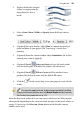
The Brushes tab lets you select a
brush type from a range of
categories. You can also view brushes
currently being used in your
document, and edit brushes (p. 96)
or create your own brushes (see
DrawPlus Help).
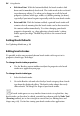
Stroke and spray brush
types are indicated by symbols.
To make sense of all the brush types available to the user, the preset brushes are
stored under a series of pre-defined categories under the name Global—the
brushes are available to all DrawPlus documents currently open. The Document
category shows the brush types currently in use in the DrawPlus drawing and is
used to “bookmark” brushes for easy reuse in the future.
At some point, you may want to edit, copy or create your own stroke or spray
brush type. See DrawPlus Help.
Brush strokes can be applied directly to the page by using your mouse or pen
tablet; the latter method is ideally suited for applying pressure-sensitive strokes
to your drawing. However, painting with the mouse still provides a viable
alternative to the tablet, where pressure sensitivity is controlled via the Pressure
tab or set on a per brush basis.
Applying brush strokes
The Paintbrush Tool is used exclusively to apply brush strokes to the
page. The tool is used in conjunction with the Brushes tab, and a supporting
context toolbar.
To apply a brush stroke:
1. Select the Paintbrush Tool from the Drawing toolbar.