
User manual






8
3 Getting started
Planning the location of your TextLink Textphone
Situate your TextLink textphone close enough to the telephone and mains power
sockets so that cables will reach.
1 Connect power supply unit to the TextLink textphone and power supply socket.
2 Install the back-up batteries.
If the power fails or if you need to unplug your TextLink textphone,the back-up batteries
will ensure you can still operate the TextLink textphone.
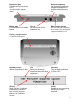
Press down on the two clips on the bottom of your TextLink textphone and flip open the
battery compartment cover. Insert 4 x Alkaline AA batteries. Make sure they are the
right way around. See the battery + and - symbols in the compartment. Hold the clips
with one hand and clip the cover back into place with the other hand.
HANDY HINTS
Only use approved batteries. Using unapproved batteries will invalidate your guarantee
and may damage the textphone.
3 Plug the telephone line cord into the back of your TextLink textphone. Plug the
other end into the telephone line wall socket.
4 If required, connect a telephone or fax machine into the external telephone
socket on the back of your TextLink textphone.