
User manual






10
3.1 How to set the time and date
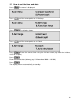
Press The menu is displayed.
Press
until the arrow points to >5.Settings.
Press The display shows:
Press until the arrow points to >6.Clock.
Press Enter the correct time using the 24 hour clock (eg. 0930 for 9.30am,
1615 for 4.15pm).
Press
Enter the correct date (ddmmyy eg. 19 November 2000 = 191100).
Press
The display returns automatically to standby.