
Technical data

3
Link
Activity
Status
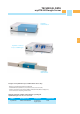
myUTN-80
1 2 3 4 5 6 7 8
Network
Server
myUTN-80
Internet
WAN
V
i
r
t
u
a
l
B
r
a
n
c
h
O
c
e
T
e
r
m
i
n
a
l
s
/
T
h
i
n
C
l
i
e
n
t
s
S
e
r
v
e
r
R
o
o
m
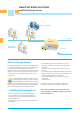
USB VIRTUALIZATION
myUTN-80 Dongle Server
myUTN-80 is compatible with 32- and 64-Bit Windows
operating systems, also in virtualized environments based
on VMware, Citrix XEN and Microsoft Hyper-V!
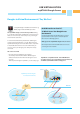
No USB Interface on Your PC?
So What? Access Your Dongle Across
the Network!
PC without USB interface? Are all USB interfaces occupied
by other USB devices? Or do you use a virtual computer?
Where does the USB dongle go then?
Well, it goes into a myUTN-80 dongle server, of course!
Gain independence from fixed USB interfaces and access
your dongles via the network!
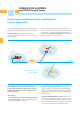
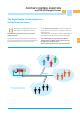
myUTN-80 provides dongles
for virtual environments
Is using USB dongles in virtualized environments, e.g.
VMware, Hyper-V and Citrix XEN, impossible?
The myUTN-80 dongle server makes it possible! Utilizing
it, you will be independent of USB interfaces in these environ-
ments, too! You can easily and securely access your dongles
via the network at all times!
In environments with desktop virtualization, USB dongles
could only be attached directly, i.e. locally. But now there is
myUTN-80! The dongle server is the ideal solution: It provides
a virtual USB cable extension across the network that you
can use to access your dongles, just as if they were locally
connected.
This is done in a wink:
· First step: Connect myUTN-80 to the network.
· Second step: Install the SEH software UTN Manager on
all PCs and notebooks from which the dongles are to be
accessed.
· Third step: Insert dongles in myUTN-80 – you are ready to go!
Dongles in Virtual Environments? Yes, We Can!