
Technical information


Sega Saturn Software Development Standards, SOA version 2.0 34
• Mid-Game Participation
In a multiplayer game where players can enter into the game at
any given time, there is a possibility that additional controllers
that have been connected at that time may cause the player
numbers to go out of sequence.
Basic 6Player setup protocol recognizes that there may be empty
ports between active ports. In addition, the additional connection
of peripherals for mid-game participation is also recognized.
Therefore, there is a possibility that the player numbers may go
out of order depending on how the additional controllers are
connected.
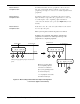
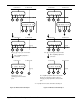
The following guidelines are meant to avoid this problem:
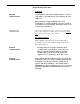
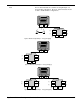
Recommended • Any peripherals that are connected to the LEFT (a side with
Compliance Item a lower port number) of a port assigned with the largest
player number are ignored. That is, the insertion of a
peripheral between 2 pre-assigned player numbers is
prohibited.
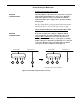
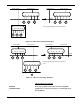
Recommended • Any peripherals that are connected to the RIGHT of a port
Compliance Item assigned with the largest player number are recognized. The
addition of player numbers is recognized by the application.
The guidelines above were developed based on the assumption
that most 6Player users will connect peripherals consecutively
from the left side as explained in the 6Player instruction manual.
Saturn Mouse
Required All Sega Saturn applications that support the Saturn Mouse
Compliance Item must also support operations from the standard Sega Saturn
Control Pad, Virtua Stick, Mission Stick (digital mode).
Compatibility of operations with the 6Player is also required.
What is the Saturn Mouse?
The Saturn Mouse is a pointing input peripheral device that outputs
analog X and Y coordinate data. The mouse is equipped with A, B,
and C buttons and a START button.