
User Manual





Rev. 20190228A
To Contents 20 of 23
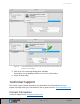
Figure 6: SecureDrive displays under the list of External Drives when done (as
well as on the desktop).
5. Click Done in the message dialog when available.
SecureDrive is now displayed under External in the left column.
6. Close the Disk Utility.
Technical Support
This section covers contact information and information that SecureData, Inc. may
require to quickly assist you. Our website is also a great resource. www.securedrive.com
Contact Information
Technical Support email: help@securedrive.com