
User Manual





Rev. 20190228A
To Contents 16 of 23
2. Unlock the drive with either User or Admin PIN. (To create a User PIN if you have
not already done so, see Creating a User PIN after a Reset (blank Drive) on page
15.)
3. Open Explorer.
4. Right-click This PC > Left-click Manage.
5. In the Computer Management dialog’s left column, click Storage > Disk
Management and wait for it to populate.
6. If the Initialize Disk dialog doesn't popup, R-click the ‘Unknown’ (or ‘Not
Initialized’), usually Disk 1, and click Initialize disk.
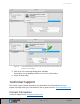
Figure 2: Initializing the Secure Drive disk (shown here as Disk 1).
7. Make sure GPT is selected and then click OK.