
Manual


ENFORCER Wireless Video Door Phone
SECO-LARM U.S.A., Inc. 7
Installation – Monitor (continued):
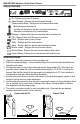
MENU
EXIT
OK
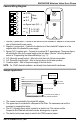
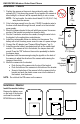
1. Place the
monitor into the
monitor charger
stand and plug
the charger into
the stand.
2. Plug the charger directly into the monitor.
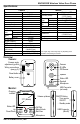
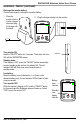
ON/OFF
Battery
level
indicator
Standby/
Low
battery
indicator
Recharge the monitor battery:
There are two ways to recharge the monitor battery.
Turn monitor ON:
Hold the "ON/OFF" button for 3 seconds. The monitor will turn
ON with the ENFORCER screen.
Standby mode:
If the display is OFF, press the "ON/OFF" button momentarily
to leave standby mode and turn the display ON. The red
indicator LED will flash once every three seconds in
standby mode.
Low battery:
When the battery is low (indicated by 1 or 0 bars on the
display's battery icon), the red indicator LED will start to flash
once per second.
Turn monitor OFF:
While the monitor's display is ON, hold the "ON/OFF" button
for 3 seconds and the Shutdown menu will come up. Select
"YES" to turn the monitor OFF.
MENU
EXIT
OK