
Instruction manual


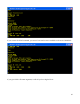


Check the disk directory, and you will see the MONITOR.COM file in place. Once this file is on the
disk, all we need to do is enter MONITOR at the CP/M prompt, and we can use the monitor commands
to do binary file transfers. When we are done with the monitor, we can enter the cpm command to
return to CP/M:
We can use the RAM monitor bload command to put any program we want into memory at 0x0100,
provided it is not larger than 55,807 bytes (to keep it from running into monitor variables and stack
space in page 0xDB00). Once a file is loaded, we can switch back to CP/M, and then SAVE the
programs. We can load other types of files as well.
The first files we should load are the standard CP/M transient command files. The binary files for these
34